








Top 10 Insight7 Alternatives & Competitors 2026
Looking for alternatives or competitors to Insight7? When evaluating AI-powered research and insights platforms, consider accuracy, collaboration tools, and how well the platform turns qualitative data into actionable findings. The best Insight7 alternative is Dovetail, but other providers like Aurelius, Grain, and Balto deliver strong value depending on your goals.
What is Insight7
Insight7 is an AI-powered research and insights platform that helps teams analyze customer feedback, support calls, and other qualitative data at scale. It synthesizes transcripts, identifies themes, and surfaces sentiment and customer pain points, enabling product, CX, and research teams to uncover insights faster, align decisions, and prioritize the opportunities that matter most.
Insight7 Overview
Insight7 is best suited for product, CX, and research teams that need to analyze large volumes of qualitative data such as interviews, customer feedback, surveys, and transcripts. It is ideal for organizations that want to accelerate research synthesis, uncover themes and customer pain points, and centralize insights so they can make faster, evidence-based decisions without manually reviewing hours of raw data.
Insight7 Features and Capabilities
Pros
- checkMakes qualitative research synthesis significantly faster by automating summaries, tagging, and theme detection.
- checkCentralizes interviews, feedback, and transcripts into one searchable workspace for cross-functional teams.
- checkEasy for product, UX, and CX teams to adopt without a heavy technical setup.
- checkHelps identify customer pain points and opportunities that may be difficult to spot manually.
- checkAffordable for teams that want AI-powered research insights without committing to a large enterprise platform.
Cons
- closeDoes not offer real-time call guidance or in-call performance support.
- closeLacks advanced analytics and forecasting features found in enterprise CI or VoC platforms.
- closeCustomization of dashboards and reporting is more limited than higher-end research tools.
- closeLess robust for regulated industries that require strict compliance or QA workflows.
- closeBest suited for qualitative insights, so teams needing deep quantitative analytics will need additional tools.
Insight7 Alternatives & Competitors 2026
Swipe to compare all vendors →
| Feature | Insight7 | Dovetail | Condens | Aurelius | EnjoyHQ / UserTesting | Reveall / NEXT | Grain | Fireflies | Otter | Balto | Observe.AI |
|---|---|---|---|---|---|---|---|---|---|---|---|
| AI-Powered Transcription | ✓ | ✓ | ✓ | ✗ | ✓ | ✓ | ✓ | ✓ | ✓ | ✓ | ✓ |
| Theme and Pattern Detection | ✓ | ✓ | ✓ | ✓ | ✓ | ✓ | ✗ | ✗ | ✗ | ✓ | ✓ |
| Automated Tagging and Categorization | ✓ | ✓ | ✓ | ✓ | ✓ | ✓ | ✗ | ✗ | ✗ | ✓ | ✓ |
| Sentiment Analysis | ✓ | ✗ | ✗ | ✗ | ✗ | ✓ | ✗ | ✓ | ✗ | ✓ | ✓ |
| Research Repository & Searchable Insights | ✓ | ✓ | ✓ | ✓ | ✓ | ✓ | ✗ | ✗ | ✗ | ✗ | ✗ |
| Omnichannel Capabilities | ✓ | ✓ | ✓ | ✓ | ✓ | ✓ | ✗ | ✗ | ✗ | ✓ | ✗ |
| Collaboration and Sharing Tools | ✓ | ✓ | ✓ | ✓ | ✓ | ✓ | ✓ | ✓ | ✗ | ✓ | ✗ |
| Real-Time Agent Guidance | ✗ | ✗ | ✗ | ✗ | ✗ | ✗ | ✗ | ✗ | ✗ | ✓ | ✓ |
✓ Offered · ✗ Not offered
Top Insight7 Alternatives & Competitors
Dovetail
Dovetail is a leading qualitative research repository and analysis platform that helps product, UX, and research teams store, organize, and synthesize customer insights. While Insight7 focuses heavily on AI-powered summaries, automated tagging, and rapid theme detection, Dovetail emphasizes structured research management, customizable repositories, and collaborative workflows for teams with more mature research operations.
Key features
- boltCentralized research repository for interviews, notes, usability tests, and customer feedback
- boltTagging, coding, and highlight tools for manual or semi-automated synthesis
- boltTheme tracking and insights dashboards for identifying recurring patterns
- boltFlexible project structures for different research methodologies
- boltCollaboration tools for sharing findings with product and cross-functional teams
- boltIntegrations with transcription providers, research platforms, and productivity tools
Pros
- checkHighly customizable repository structure that scales with larger research teams
- checkStrong collaboration and sharing tools that keep insights accessible across the organization
- checkFlexible coding and tagging workflows for teams that prefer hands-on synthesis
- checkWidely adopted in UX research, making it easy to hire or onboard researchers familiar with the tool
- checkPowerful search and filtering for long-term research management
Cons
- closeLess automation than Insight7, requiring more manual tagging and synthesis
- closeAI summaries and theme extraction are available but not as fast or streamlined as Insight7’s
- closeIt can feel complex for smaller teams without a dedicated research function
- closeNot built for analyzing support calls or multi-source operational data
- closeNo real-time insights or in-call guidance for customer-facing teams
Why Are Contact Centers Switching from Insight7 to Balto?
Real-Time Guidance Instead of Post-Call Insights
Insight7 analyzes conversations after they happen, while Balto improves outcomes during the call with live prompts, dynamic checklists, and compliance cues.
Operationalizing Insights, Not Just Surfacing Them
Balto turns what teams learn from customer research into consistent, repeatable agent behavior on every call, bridging the gap between insights and execution.
Trusted by Top Contact Centers
Your business is in good hands with Balto. With a 4.8 rating and over 300 reviews on G2, Balto is the favorite real-time solution for top-performing contact centers.
Why You Should Choose Balto Over Insight7
With our smarter AI, simple onboarding with one-day integrations, and focus on agent empowerment, we think the choice is clear. We invite you to get a demo to see the difference for yourself.
Book a meetingHere’s what our fans have to say on G2
"It is time sufficient & very useful since we are unable to memorize all scenarios[...]. It helps us also for holistic customer experience."
Benedict V.
Sr. Customer Service Assistant
"It gives the user a more effective way to assist the customer's concern through scripts & troubleshooting steps that pop up using audio cues. Because of this, I can efficiently assist the customer without wasting my time looking for resources."
Erica M.
Customer Service Representative
"I love having all the information I need right at my disposal and that it can be updated seamlessly as needed. Balto helps me meet and exceed my monthly quality assurance metrics each month."
Erica C.
Patient Balance Solution Advisor
"I really like Balto's note-taking ability live on the call. [...] Balto helps agents keep track of calls and provides insights into call volume and reasons for calls."
Farzan G.
Desktop Support II / Field Tech
"It keeps me in compliance, with a level of profesionalism, as well it keeps me in a good flow and order for the applications."
Tania S.
License Insurace Agent.
"Balto makes call reviews a breeze. Balto is a great call assistant for our support analysts. It provides reminders of critical call script items and helps guide the analysts through effective call handling. The best benefits start after the call. Analysts are provided customizable call summary information that can be used to fill out tickets, all calls are QA scored, and supervisors are provided AI powered search and analysis features. Balto has been extremely helpful with implementation and recommendations for effective usage."
Verified User
Enterprise, Customer Service & Sales
"Balto is amazing. I like how it captures the conversation. This saves me so much time when logging my call notes. It’s truly amazing and I use it with every call I receive or make. It’s very easy to incorporate words as well. Balto is so easy to use and the features that come with Balto are so helpful. Balto is also very easy to install and integrate into your company’s system."
Diana W.
Small Business, Customer Service
"Very Easy to Use. Balto is the simplest, easy to learn software I’ve used in the industry. I can’t think of a time when I didn’t use it in a call. I use Balto quite frequently throughout my day. Balto is also easy to integrate and implement into whatever software you use. The customer service is top notch and the number of features is fantastic!"
Isaiah
Mid-Market, Sales
"It automatically highlights what you can say to the customer with it's amazing recognition of what customer says. It also now has notes automatically."
Mary Jane M.
"I like that Balto can be tailored to how I specifically talk with customers. I love that it gives me tips when explaining the process to customers."
Lori-Ann H.
"What I love most about Balto is that it keeps me on track when I feel like I don't know where to go next of if I happen to forget what to do next."
Verified User
"I love the Checklist. It's so helpful to see what I've already said/done and the animations help make me feel happy and encourages me on a bad day"
Sha'Quan J.
"Being able to copy and paste the summary notes onto an appointment for a clear understanding by team and all involved of the situation discussed."
Jenna C.
appointment booking
"It's always there to share tips and ideas with how you can improve and allows you to see what you may have missed and needs to be stated."
Wardella B.
"I enjoy the ability to check if I missed any QA questions before an audit so that I can know what parts of the script I commonly overlook"
Denise R.
"The suggested script made it easier for me to ask open ended questions. This helps me converse with the customer and assess their needs."
Angelica B.
"What I like best is that it gives you tips or information while you are speaking. It is very accurate with what you are talking about."
esmeralda u.
CUSTOMER SERVICE ASSOCIATE
"I love the real-time listening. I'm not waiting until after the call to make adjustments, I can make them at the moment I need them."
Verified User
"how balto listens to you on a call, it hears what your saying and then tells you what you have hit and missed keeping you on track."
daniel k.
benefits consultant
"the 1st set of Questions were PERFECT and now you added more thats already and originally part of the Market Place requirement"
Marilyn T.
"Its very helpfull when I'm in need of ways to help get a payment for our company and helps me keep track of the conversation."
Lacy M.
"I like that Balto keeps me on track, helps me to review what I can do better on the next call, and gives real time rebuttals."
Verified User
"That it catches automatically the workflow and allows you to realize what part of the Script you havent said. As well it automatically detects rela..."
Yazmin P.
Account Manager
"That balto really helps out with the quality of service we provide."
Jonathan M.
customer service insurance supervisor
"Most of its features but more on the ability to review data, it help me to quantify the data that I need and help me analyze reports more accuratel..."
Romina T.
Operations Manager
"It's good, especially if it's an outbound calling campaign, because all the objections and what you say can be provided by Balto, and it won't be d..."
Krian S.
Scheduling Coordinator
"Balto can do anything & everything we could want. Which, could be overwhelming, if the content and features weren't explained/trained properly. The..."
Alexis K.
Manager of Guest Care
"My job requires detailed reviews of our phone calls; summaries of what the customer and agent discussed. Instead of trying to recall what was said ..."
Nashon C.
Sales manager
"It has made remote work and training seamless as Balto guides the agent new or experienced through the call, and with dynamic prompts to help with ..."
John Z.
Operations Manager
"Balto helps my team get through their calls and know where to go next without having to disrupt the "human" aspect of the call! They can form rela..."
Beth P.
Data Entry Manager
"Call explorer for myself but the checklist is very easy to utilize and custom with every agent"
Anna R.
Quality Assurance Supervisor and Training Assistant
"Balto has worked continuously with my company to find a happy medium on the kind of summary they are providing after calls. I am more than happy wi..."
Melissa T.
Assistant Account Manager
"I truly appreciate how Balto ensures our customer service is up to par and of top tier quality."
Raphael R.
Stabilization Manager
"Balto is very user friendly. This software is really simple to learn and use. Balto provides increase confidence in its users, let's not forget to ..."
Sarina T.
Assistant Account Manager
"Balto has been helpful for gaining insights, spotting trends, and coaching agents more effectively, which ultimately helps us improve our customer ..."
Aliyah H.
Contact Center Supervisor
"Having a partner like Balto has been great. The features are very helpful to our team and the implementation process was exceptional. Andrew and th..."
Tony J.
operations manager
"It is user friendly and accurate. It has helped me run my team's QA and helped me to be more efficient with feedback."
Tatiana G.
Internal Collections Supervisor
"Balto is fantastic. The company does an amazing job and is continually working to update and innovate."
Sam Wheaton
Contact Center Supervisor
"One of the best tools I’ve used! Whereas before, we took samples of calls, and did as much as we could, but we had hundreds of calls happening daily, and it was pretty impossible to capture all of that. Now people can see what’s actually being said, transcripts can be pulled up, instead of listening to hours of calls. We’ve seen noticeable improvements with close rates"
Alex D.
Call Center Supervisor
"We wanted to find a way to help our team members consistently provide a high level of patient experience every single phone call they had."
Pamela Velasquez
Manager
"This helps newly hired employees feel more comfortable on the phone right out of the gate."
Britni H.
Recovery Specialist Supervisor
"Balto helps guide the conversation and keeps our team consistent and compliant."
Luan D.
IT Leader or Manager
"Balto is Awesome. Balto is very using and populates quick responses and shows us exactly what to say and keeps us compliant."
Anonymous
Enterprise, Customer Service
"It actively listens to your call and suggests phrases to help you out with closing the client through the entire process."
Verified User
"It goes with your call flow. Easy to use, and it tells you how well you are doing along with your team and so much more!"
Lessette L.
"I appreciate how well the Balto app summarizes and organizes conversations. Its user-friendly interface makes it easy to navigate."
John Nero P.
Team Leader
"Balto solves quick objection rebuttals & real-time coaching, eliminating the need for hard copies of sales scripts. The leaderboard stats help me track key points in real-time, increasing my sales."
Mark M.
Sales Group Supervisor
"The software is great. But the implementation process was exceptional! The team we worked with was knowledgable, efficient, & did a fantastic job of getting us up & running with very limited interruption to the team."
Andrew M.
Owner
"It was very easy to write the play book and use the dynamic prompts."
Steven J.
Operations Director
"Everything! The checklist keep my agents on track, the agents love when they get a win and the confetti goes off. I love the dynamic prompts that h..."
Jessica P.
Call Center Director
"I love ho wbalto capture the essence of the conversation & How balto summarize every conversation and provided insights."
John-Nero P.
Associate Director of Admissions
"its AI feature for analytics, and the summarization of each interaction."
Vincent V.
Admissions director
"What I love most about Balto is the real-time coaching feature. It’s amazing how I can get live feedback and guidance during calls, helping me stay..."
Christian E.
ASSOCIATE DIRECTOR OF ADMISSIONS
"Balto's AI to detect what is being said in the call and the ability to prompt the agent on the phone with the right things to say in every scenario..."
Luis M.
Head of Operations
"I really love the real-time speech analytics tool Balto offers. It provides real-time insights into conversations, ensuring we cover everything nec..."
Matthew T.
Director of Portfolio Management
"We infused Balto into our ecosystem, we encourage our team members to utilize the different aspects of the tool, and over the last year, we’ve seen our NPS score take a gradual incline and over the last two months, a very steep incline. There’s a direct correlation with our percent of compliance to our Balto metrics. […] Over the last two months, we’ve consistently been in the 93-95% range and we’re now in a 65-70% range on our NPS score."
Barry Pritchett
VP of Care Logistics
"We had to scale fast and get new agents trained quickly,"
Ken Monroe
VP of Customer Service
"If you wanted to find one specific moment in a call,"
Chip Kennedy
VP of Shared Services
"Before Balto, our supervisors had to listen to each call manually. That’s just not scalable."
James Luxton
VP of Customer Service
"Our blueprint works; but we wanted to help our agents follow it and set them up for success,"
Jeremy Duane
Director of Sales
"Balto has fundamentally changed our onboarding process. We’ve reduced training time from about six months to one month."
Aaron Asher
Owner
"With Balto, agents had the right words at the right moment and our handle time dropped."
Mark Poisson
Director of AI
"If you wanted to find one specific moment in a call,"
Ivonne Ortiz
Director of Training & Quality
"Balto has been a great tool from a coaching perspective and gives our agents real-time rebuttals."
Tony F.
VP of Sales and Business Development
"Balto is a great tool for increasing compliance adherence, conversions, and suggestive call guidance."
Brandon T.
President
"We did a review with one of our agents, and she had been a consistently good agent but not a top sales performer. She was always mid to low in terms of closes. And so we brought Balto in and in that first year, after doing that, her conversion rate literally doubled, which was shocking because nothing else had changed."
Contact Center Technology Leader at Leading Flooring Company
Condens
Condens is a qualitative research analysis platform that helps UX and product teams organize interviews, tag insights, and build structured research outputs. While Insight7 focuses heavily on automated summaries, AI-powered theme detection, and rapid synthesis across multiple data sources, Condens emphasizes flexible tagging, researcher-driven coding, and clear visualization tools that support more hands-on qualitative analysis.
Key features
- boltCentralized workspace for interview transcripts, notes, and usability test data
- boltManual and semi-automated tagging tools for coding qualitative findings
- boltThematic maps and clustering to visualize emerging patterns
- boltParticipant and session management for organizing ongoing research
- boltInsights repository for storing findings and sharing them with stakeholders
- boltIntegrations with transcription tools, research platforms, and collaboration apps
Pros
- checkIntuitive interface that supports structured, researcher-led analysis
- checkFlexible tagging and coding workflows are ideal for mixed or exploratory research
- checkClear visualization tools that make it easy to identify themes and build narratives
- checkStrong repository features for storing insights over time
- checkGreat fit for teams who want more control over their synthesis process
Cons
- closeLess automation than Insight7, which may slow teams needing fast turnaround
- closeAI summaries and theme extraction are available but not as advanced or hands-free
- closeLimited sentiment or intent analysis compared to AI-first platforms
- closeNot optimized for large-scale support call ingestion or multi-source operational data
- closeNo real-time insights or in-call assist for customer-facing teams
Aurelius
Aurelius is a qualitative research and insights platform designed to help teams tag, organize, and synthesize feedback across interviews, usability tests, and customer conversations. While Insight7 automates much of the synthesis through AI-powered summaries, tagging, and theme detection, Aurelius focuses on flexible organization, manual coding, and long-term insight management for teams that prefer hands-on qualitative analysis.
Key features
- boltCentralized repository for research notes, transcripts, and audio or video files
- boltManual tagging, coding, and categorization tools for thematic analysis
- boltInsight cards and grouping features to organize key findings
- boltSearchable database of historical research and insights
- boltProject templates and organizational structures for repeatable workflows
- boltIntegrations with transcription tools, cloud storage, and productivity apps
Pros
- checkStrong, flexible tagging workflows for teams that prefer researcher-led synthesis
- checkInsight cards make it easy to organize and share qualitative findings
- checkIdeal for teams managing long-term research repositories
- checkCustomizable structures that support many research methodologies
- checkLightweight interface that is easy for cross-functional teams to navigate
Cons
- closeMuch slower than Insight7 for rapid, AI-driven synthesis
- closeLimited automated tagging or theme detection compared to Insight7
- closeNo sentiment or intent analysis out of the box
- closeNot designed for large-scale support call ingestion or multi-data consolidation
- closeNo real-time insights or customer-facing coaching workflows
EnjoyHQ / UserTesting
EnjoyHQ, part of the UserTesting platform, is an enterprise-level research repository and insights management system that centralizes qualitative data from interviews, support tickets, surveys, and usability studies. While Insight7 focuses on rapid, AI-driven synthesis with automated summaries and theme detection, EnjoyHQ emphasizes long-term insight management, governance, and cross-team research alignment within the larger UserTesting ecosystem.
Key features
- boltUnified research repository that aggregates interviews, usability tests, support conversations, NPS data, and product feedback
- boltPowerful search, filtering, tagging, and metadata tools for structuring large volumes of research
- boltInsight boards and customizable dashboards for cross-functional storytelling and reporting
- boltDeep integrations with UserTesting for managing studies and connecting raw sessions to synthesized insights
- boltEnterprise-grade governance, permissions, and data organization
- boltIntegrations with tools like Zendesk, Intercom, Slack, transcription services, and analytics platforms
Pros
- checkStrongest option for organizations that already use UserTesting and want a connected ecosystem
- checkRobust repository features that scale across multiple teams and departments
- checkExcellent governance and organizational controls for enterprise research operations
- checkFlexible dashboards that make it easier to socialize insights with product, design, and CX groups
- checkDesigned for long-term storage and reuse of insights across ongoing research programs
Cons
- closeLess automation than Insight7, requiring more hands-on tagging and synthesis
- closeTheme detection and summarization features are not as fast or AI-forward as Insight7
- closeComplexity may be overwhelming for smaller research teams without dedicated operations support
- closeMore expensive due to its enterprise positioning within the UserTesting suite
- closeNot designed for real-time insights or coaching for frontline customer-facing teams
Reveall / NEXT
Reveall, now part of the NEXT platform, is a customer insights and product discovery tool that helps teams centralize feedback, map customer journeys, and translate qualitative data into actionable product decisions. While Insight7 specializes in rapid, AI-driven synthesis with automated summaries and theme detection, Reveall emphasizes structured discovery workflows, collaborative insight management, and connecting customer needs directly to product strategy within the broader NEXT ecosystem.
Key features
- boltCentralized repository for interview notes, customer feedback, surveys, and product insights
- boltAutomated tagging and categorization to streamline qualitative organization
- boltCustomer journey mapping to visualize pain points and opportunity areas
- boltPrioritization frameworks and opportunity scoring through NEXT
- boltInsight boards for aligning product, UX, and engineering teams
- boltIntegrations with tools like Zendesk, Intercom, Slack, and popular research platforms
Pros
- checkStrong integration with NEXT’s product discovery and prioritization tools
- checkJourney mapping provides a clear, visual understanding of customer experience gaps
- checkIdeal for product teams needing direct alignment between insights and roadmap planning
- checkAutomated tagging helps reduce manual effort during synthesis
- checkCollaboration features make it easy for cross-functional teams to share and act on insights
Cons
- closeAI summaries and theme extraction are not as advanced or fast as Insight7
- closeLess suited for teams handling large volumes of qualitative interviews at scale
- closeNot optimized for multi-source data ingestion such as support calls or operational feedback
- closeCan feel more complex for teams not focused on product discovery frameworks
- closeNo real-time insights or performance support for customer-facing teams
Grain
Grain is a meeting insights and AI note-taking platform that helps teams capture highlights, summaries, and searchable insights from customer calls, interviews, and internal meetings. While Insight7 focuses on deeper qualitative synthesis with automated tagging, theme detection, and multi-source data analysis, Grain emphasizes fast meeting summaries, highlight clips, and lightweight insights to help teams share key moments quickly.
Key features
- boltAutomatic recording, transcription, and AI-powered meeting summaries
- boltHighlight clipping tools for capturing important moments from interviews or customer calls
- boltTopic extraction and light categorization for quick organization
- boltSearchable call library for storing and sharing insights across teams
- boltIntegrations with Zoom, Google Meet, Microsoft Teams, and CRMs
- boltCollaboration tools for sharing clips, notes, and meeting takeaways
Pros
- checkVery fast and easy to use for capturing key insights from any meeting or interview
- checkHighlight clipping makes it simple to share impactful moments with stakeholders
- checkGreat fit for teams wanting a lightweight alternative to full research platforms
- checkAffordable and accessible for small to mid-sized teams
- checkIntegrates cleanly with popular video conferencing tools
Cons
- closeDoes not offer deep AI synthesis like Insight7’s automated tagging and theme detection
- closeNot designed for multi-source qualitative analysis or research repository workflows
- closeLimited support for sentiment or intent analysis beyond basic signals
- closeLess suited for product discovery or long-term insight management
- closeNo real-time coaching or guidance for customer-facing teams
Fireflies
Fireflies is an AI note-taking and meeting transcription platform that captures calls, generates summaries, and provides light conversation analysis. While Insight7 focuses on deep qualitative synthesis with automated tagging, theme detection, and multi-source research consolidation, Fireflies emphasizes fast transcription, meeting notes, and lightweight insights designed for efficiency rather than full research analysis.
Key features
- boltAutomatic recording and transcription for meetings, interviews, and customer calls
- boltAI-generated summaries, action items, and conversation highlights
- boltBasic sentiment analysis and keyword detection
- boltSearchable workspace for reviewing past meetings
- boltIntegrations with Zoom, Google Meet, Teams, Slack, CRMs, and project tools
- boltCollaboration tools for sharing notes and highlights with teammates
Pros
- checkVery fast, reliable transcription and summary generation
- checkEasy for teams of any size to adopt without training or complex setup
- checkAffordable option for organizations that only need meeting capture and summarization
- checkIntegrates well with common video conferencing and productivity tools
- checkGreat for reducing manual note-taking and speeding up follow-ups
Cons
- closeLacks deep qualitative synthesis compared to Insight7
- closeNo automated theme detection, opportunity mapping, or multi-source data consolidation
- closeSentiment and analytics are lighter and less precise
- closeNot designed as a research repository or insight management system
- closeNo real-time guidance or coaching for customer-facing roles
Otter
Otter is a lightweight transcription and meeting notes platform designed for capturing conversations, generating summaries, and enabling quick review of meetings and interviews. While Insight7 focuses on deeper qualitative analysis (automated tagging, theme detection, sentiment, and multi-source data synthesis), Otter is built primarily for fast, accessible transcription rather than structured research or insight management.
Key features
- boltAutomated recording and transcription for meetings, interviews, and lectures
- boltAI-generated summaries, bullet notes, and key highlights
- boltLive transcript collaboration for teams working in real time
- boltSearchable archive of recorded meetings and notes
- boltIntegrations with Zoom, Teams, Google Meet, and standard productivity tools
- boltMobile and web apps for capturing conversations anywhere
Pros
- checkExtremely easy to use with minimal setup
- checkFast, reliable transcription suitable for quick documentation
- checkAffordable option for individuals and small teams
- checkLive collaboration features are helpful for note-taking in real time
- checkGreat for meeting documentation and accessibility needs
Cons
- closeVery limited qualitative analysis compared to Insight7
- closeNo automated tagging, theme extraction, or sophisticated synthesis
- closeNot designed as a research repository or insight-sharing platform
- closeMinimal sentiment or intent analysis
- closeNo real-time coaching or data-driven guidance for customer-facing teams
Balto
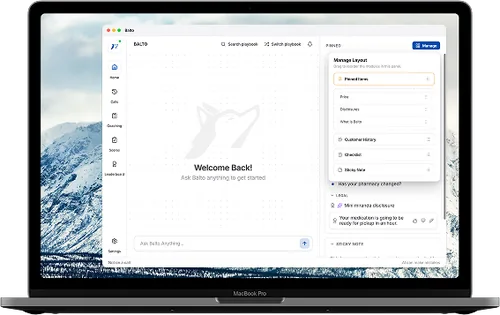
That’s usBalto is a real-time agent guidance platform that provides in-the-moment prompts, checklists, and compliance cues during live customer conversations. While Insight7 focuses on post-call qualitative synthesis (automated summaries, theme detection, and research insights), Balto operates during the call itself, helping agents follow best practices, improve CSAT, and reduce repeat calls through live coaching and QA automation.
Key features
- boltReal-time on-screen prompts that guide agents through calls step by step
- boltDynamic checklists that adapt based on customer responses
- boltAutomated compliance monitoring and alerts
- boltReal-time QA scoring and workflow automation
- boltCoaching dashboards to standardize agent performance
- boltIntegrations with leading CCaaS, telephony, and CRM platforms
Pros
- checkOnly platform in this category providing live, in-call guidance rather than post-call analysis
- checkImproves agent performance and customer outcomes immediately
- checkReduces repeat calls and compliance errors with real-time cues
- checkHelps teams standardize processes and improve CX across agents
- checkComplements research insights tools like Insight7 by operationalizing findings
Cons
- closeNot designed for qualitative research synthesis or interview analysis
- closeNo tagging, theme extraction, or multi-source feedback consolidation
- closeNot a repository for storing or managing research insights
- closeLess relevant for UX research teams unless they also manage contact centers
Observe AI
Observe AI is a contact center analytics and quality automation platform that analyzes 100 percent of customer calls to uncover sentiment, compliance gaps, and performance insights. While Insight7 focuses on qualitative research synthesis with AI summaries and theme detection across interviews and feedback sources, Observe AI specializes in large-scale contact center analytics, automated QA, and coaching workflows designed to improve agent performance and operational efficiency.
Key features
- boltAI-powered speech analytics for sentiment, intent, empathy, and behavioral signals
- boltAutomated QA workflows that score calls and surface coaching opportunities
- boltCompliance detection and risk monitoring across customer conversations
- boltCall transcription, categorization, and topic clustering at scale
- boltCoaching dashboards for supervisors and team leaders
- boltIntegrations with major CCaaS, telephony, and CRM platforms
Pros
- checkDeep, industry-grade analytics tailor-made for contact center environments
- checkAutomated QA dramatically reduces manual scoring effort
- checkStrong sentiment and behavioral signal detection for performance coaching
- checkScales easily across high-volume call centers
- checkUseful for compliance, efficiency, and customer experience improvement
Cons
- closeNot built for UX, product research, or multi-source qualitative synthesis like Insight7
- closeNo repository or organizational workflows for long-term insight management
- closeFocused heavily on call center operations rather than broader customer research
- closeDoes not offer real-time guidance; coaching is post-call unless paired with additional tools
- closeMore complex and expensive than lightweight research platforms
Key Features to Consider When Choosing Contact Center Software
When evaluating contact center software, it is important to understand which features will actually move the needle for agent performance, compliance, and customer experience. A strong platform should include AI synthesis, sentiment analysis, and integrated workflows among other core features.
AI Synthesis and Automation
Evaluate how much analysis a platform can automate. Some tools excel at rapid summaries, while others require more manual tagging.
Omnichannel Support
Consider whether a platform can ingest interviews, surveys, support tickets, and call transcripts. Tools vary widely in their ability to consolidate insights across channels.
Real-Time Guidance
Most research tools operate strictly after conversations happen. If you want to apply insights live, real-time guidance platforms like Balto can influence outcomes during the call.
Repository and Insight Management
If long-term knowledge retention matters, evaluate how each platform structures, stores, and surfaces insights for future use.
Workflows and Integrations
Check whether the tool connects smoothly to your existing systems, such as CRMs, CCaaS, ticketing platforms, and research tools.
Sentiment Analysis
Determine whether you need basic signals or more advanced analysis. Platforms vary widely in how deeply they detect sentiment, intent, and emotion.
When evaluating tools like Dovetail, Balto, and others, weigh how each performs in these key areas, balancing sophistication with usability to match your organization’s size, goals, and customer experience strategy.
Top Insight7 Alternatives
Top Insight7 alternatives include platforms like Dovetail, Condens, Fireflies, and Balto, each offering different strengths across qualitative research synthesis, customer insights, and conversation analytics. When comparing them, buyers should look closely at the depth of AI automation, omnichannel data support, and whether the platform analyzes insights after conversations or can influence customer interactions in real time. Balto stands out because it provides real-time guidance, giving agents dynamic prompts, compliance cues, and step-by-step workflows during live calls, turning research insights into consistent frontline execution in a way that post-call research tools like Insight7 cannot match.
FAQs
The top Insight7 competitors include Dovetail, Condens, EnjoyHQ (UserTesting), Reveall (NEXT), Grain, Fireflies, Otter, Balto, and Observe AI. Each offers different strengths across research repositories, qualitative analysis, multi-source insight management, and real-time guidance for customer-facing teams.
Insight7 specializes in post-call qualitative synthesis (automated summaries, tagging, and theme detection) while Balto focuses on real-time agent guidance. Balto helps agents follow best practices, reduce repeat calls, and improve CSAT during live conversations, turning insights into action in the moment rather than after the fact.
No. Insight7 is a qualitative research and insight synthesis platform, not a contact center performance solution. Leaders in AI-driven contact center software typically include Balto, Observe AI, and other platforms focused on real-time guidance, QA automation, and operational analytics.
Balto is the leader in real-time agent coaching, providing dynamic prompts, checklists, and compliance cues during live calls. Unlike research-focused platforms like Insight7, Balto improves outcomes while the customer interaction is happening, not just in post-call analysis.
Teams should evaluate how much automation they need, whether they require a long-term insight repository, support for omnichannel data, integration with CX or product workflows, and whether they want real-time impact on customer interactions. If live coaching, compliance support, or reducing repeat calls is a priority, platforms like Balto offer capabilities that Insight7 does not.
Found What You Were Looking For? Discover the Better Alternative, Balto.
See how Balto outperforms other AI solutions with real-time guidance, QA automation, and insights that instantly improve agent performance.

Book by phone
+1 (405) 864-4645Call and speak directly with our voice agent to book a meeting, available 24/7, no wait time.
Call now- Give agents the right answer in real time, pulled straight from your own knowledge base.
- Coach faster. Balto spots who needs it, does the prep, and takes you right to the coachable moments.
- See the trends driving your business out of the box, no setup required.
- QA every conversation automatically, so all that’s left is a quick review before it reaches leadership.